
sitemap: false
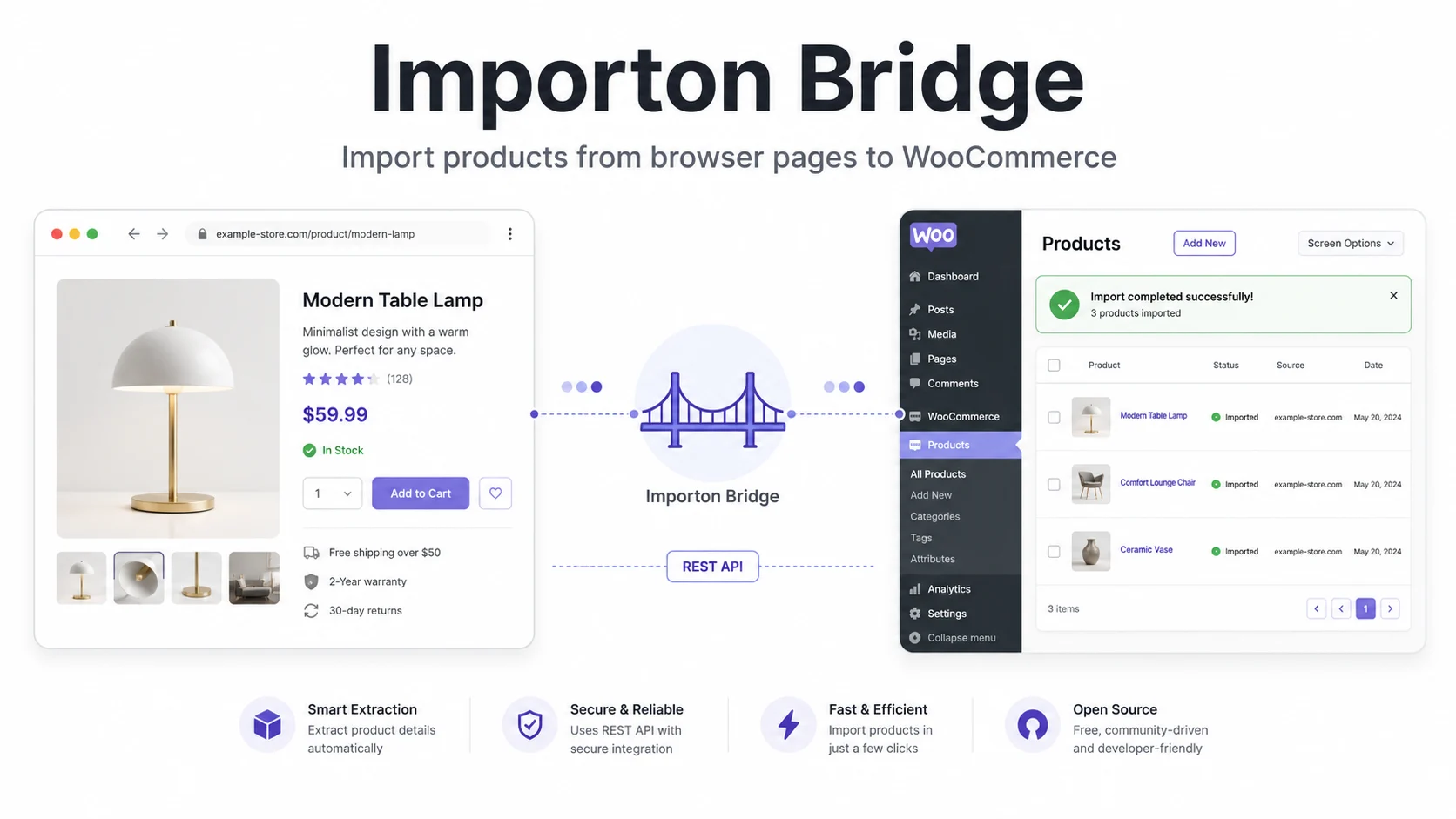
Importon Bridge is a lightweight WordPress plugin that connects a browser companion with WooCommerce. It captures permitted product data from supported supplier pages and sends it directly into your WordPress store through a clean, authenticated workflow.
The goal is simple. Instead of copying product titles, descriptions, prices, images, attributes, and variations by hand, Importon Bridge gives you a faster way to move product data from the browser into WooCommerce.
It is built for store owners and developers who want control. No bloated import dashboard. No complicated SaaS layer. Just a focused bridge between the product page you are viewing and the WooCommerce store you manage.
See the current product details, requirements, and purchase options on the Importon Bridge product page.
What Importon Bridge does
Importon Bridge is designed around a practical WooCommerce import workflow. The browser companion captures product information from the page, then the WordPress plugin receives it through a secured REST API and creates or updates the product inside WooCommerce.
- Imports product title, description, price, images, attributes, and variations.
- Supports simple and variable WooCommerce products.
- Creates or updates products through authenticated REST API endpoints.
- Adds product video support when a video URL is available.
- Stores import history and failed-item logs for review.
- Includes a batch URL queue for importing multiple product links.
- Supports optional AI rewriting through OpenAI or Google Gemini.
Importon Bridge is an independent browser-assisted product workflow. Store owners are responsible for importing only data they are permitted to use.
Why I rebuilt it as Importon Bridge
The original idea was narrowly focused on importing supplier product data into WooCommerce. But the plugin grew into something broader. It now works more like a bridge between a browser-based product capture flow and a WordPress-powered store.
That is why the new name makes more sense. Importon Bridge describes the actual purpose of the tool better. It connects the browser companion, the WooCommerce product system, the REST API, import monitoring, batch URLs, and optional AI rewriting in one focused workflow.
I also cleaned up the branding, moved more of the setup flow into the plugin admin page, and made the connection process easier. The goal is to make the tool feel more complete without making it heavy.
How the workflow works
The system has two main parts. The first part is the browser companion. It runs in Chrome or any Chromium-based browser and captures product data from the page you are already viewing.
The second part is the WordPress plugin. It adds the admin screen, connection settings, REST API endpoints, product import logic, history logs, batch URL import tools, and optional AI rewrite settings.
- Open a supported product page in your browser.
- Use the Importon Bridge browser companion to capture the product data.
- Send the product data to WordPress through the authenticated REST API.
- Create or update the WooCommerce product.
- Review import logs, failed items, and optional AI rewrite results inside WordPress.
REST API endpoints
Importon Bridge exposes authenticated endpoints under importonbridge/v1. These endpoints handle connection testing, settings, categories, and product import requests.
POST  /wp-json/importonbridge/v1/import      Create or update a WooCommerce product
GET   /wp-json/importonbridge/v1/ping        Confirm authentication
GET   /wp-json/importonbridge/v1/categories  List WooCommerce product categories
GET   /wp-json/importonbridge/v1/settings    Read connection settings
POST  /wp-json/importonbridge/v1/settings    Save connection settings
POST  /wp-json/importonbridge/v1/connect     Return connection details for the browser companion
AI rewriting support
AI rewriting is optional. It only runs when the administrator enables it from the plugin settings. This keeps the plugin useful for normal imports without forcing AI into every workflow.
- Supports OpenAI and Google Gemini.
- Stores API keys server-side in WordPress options.
- Allows provider order and model selection from the settings screen.
- Can rewrite titles and descriptions before saving product content.
Security choices
Because this plugin creates and updates WooCommerce products, the security layer matters. Importon Bridge uses WordPress-native protections instead of trying to invent its own system.
- Admin actions use WordPress nonces.
- REST endpoints check authentication and user capabilities.
- User input is sanitized before storage or processing.
- Output is escaped before rendering in the admin or frontend.
- External AI calls only run when an administrator configures them.
Requirements
Importon Bridge is built for modern WooCommerce stores and a Chromium-based browser workflow.
- WordPress 6.0 or higher.
- WooCommerce 8.0 or higher.
- PHP 7.4 or higher.
- Google Chrome or another Chromium-based browser for the browser companion.
How to install
The setup has two parts: the WordPress plugin and the browser companion. The plugin handles the WooCommerce side. The browser companion handles product capture from supported product pages.
WordPress side
- After purchase, download the current plugin ZIP from your Freemius purchase email or customer portal.
- Upload the plugin to
/wp-content/plugins/. - Activate the plugin from the WordPress dashboard.
- Make sure WooCommerce is installed and active.
- Open Importon Bridge in the WordPress admin.
Browser side
- Download the browser companion from the Importon Bridge settings page.
- Open
chrome://extensionsin Chrome. - Turn on Developer Mode.
- Click Load unpacked and select the browser companion folder.
- Create a WordPress Application Password from your user profile.
- Paste your Site URL, username, and Application Password into the connection panel.
- Use the Test Connection option before importing products.
File structure
The plugin is organized into a small set of focused files. The main plugin file loads the system, while the includes folder handles admin screens, REST API logic, frontend behavior, and batch URL importing.
importon-bridge/
├── importon-bridge.php
├── README.txt
├── README.md
├── license.txt
├── assets/
│   └── url-import-admin.js
└── includes/
    ├── class-importonbridge-admin.php
    ├── class-importonbridge-frontend.php
    ├── class-importonbridge-rest.php
    └── class-importonbridge-url-import.php
Who this is for
Importon Bridge is for WooCommerce store owners, product upload teams, and developers who want a faster import workflow without relying on a heavy subscription tool.
It is especially useful when you need to move product data from browser-based supplier pages into WooCommerce, but you still want control over what gets imported, rewritten, reviewed, and published.
What the current 0.2.2 release includes
The current release uses Importon Bridge branding throughout the plugin, WordPress admin, REST connection, browser companion, and release package.
- Browser companion product import flow.
- WooCommerce product creation and update support.
- Simple and variable product handling.
- Optional AI rewriting.
- Batch URL import queue.
- Failed-run logging and admin monitoring.
- Freemius-ready delivery and a bundled SDK in the official release package.
Why this plugin matters
Importing products should not feel like a full-time data entry job. Importon Bridge makes the process faster by connecting the product page, the browser, and WooCommerce in one direct workflow.
It does not try to be a giant dropshipping platform. It focuses on the part that actually slows people down: collecting product data, sending it into WooCommerce, reviewing it, and improving the copy when needed.
That focus is what makes the plugin useful. It is a practical bridge for people who want a cleaner product import process without giving up control of their WordPress store.