
sitemap: false
The problem with bulk editing
I spent most of last Tuesday staring at the spinning loading icon in the WooCommerce dashboard. I had about sixty products that needed price updates and category shifts. If you have ever used the default bulk edit tool in WordPress, you know how clunky it feels. You select the items, you click edit, you apply the changes, and then you pray that the server does not time out. It is slow. It feels like software built fifteen years ago. I did not want to buy a seventy dollar plugin just to change some numbers and text. I am a developer, so I figured I should just build the solution myself. I wanted something that looked like a spreadsheet but worked directly inside my admin panel without any extra bloat.
The biggest issue was time. I did not have three days to build a full React based interface with a REST API. I needed something that worked right now. I had a deadline for a client and my own shop was falling behind. I needed a tool that let me see everything on one screen, type in the changes, and hit save once. No jumping between pages. No individual product screens. Just a clean list that lets me get the work done so I can go back to actually building things.
What this solves
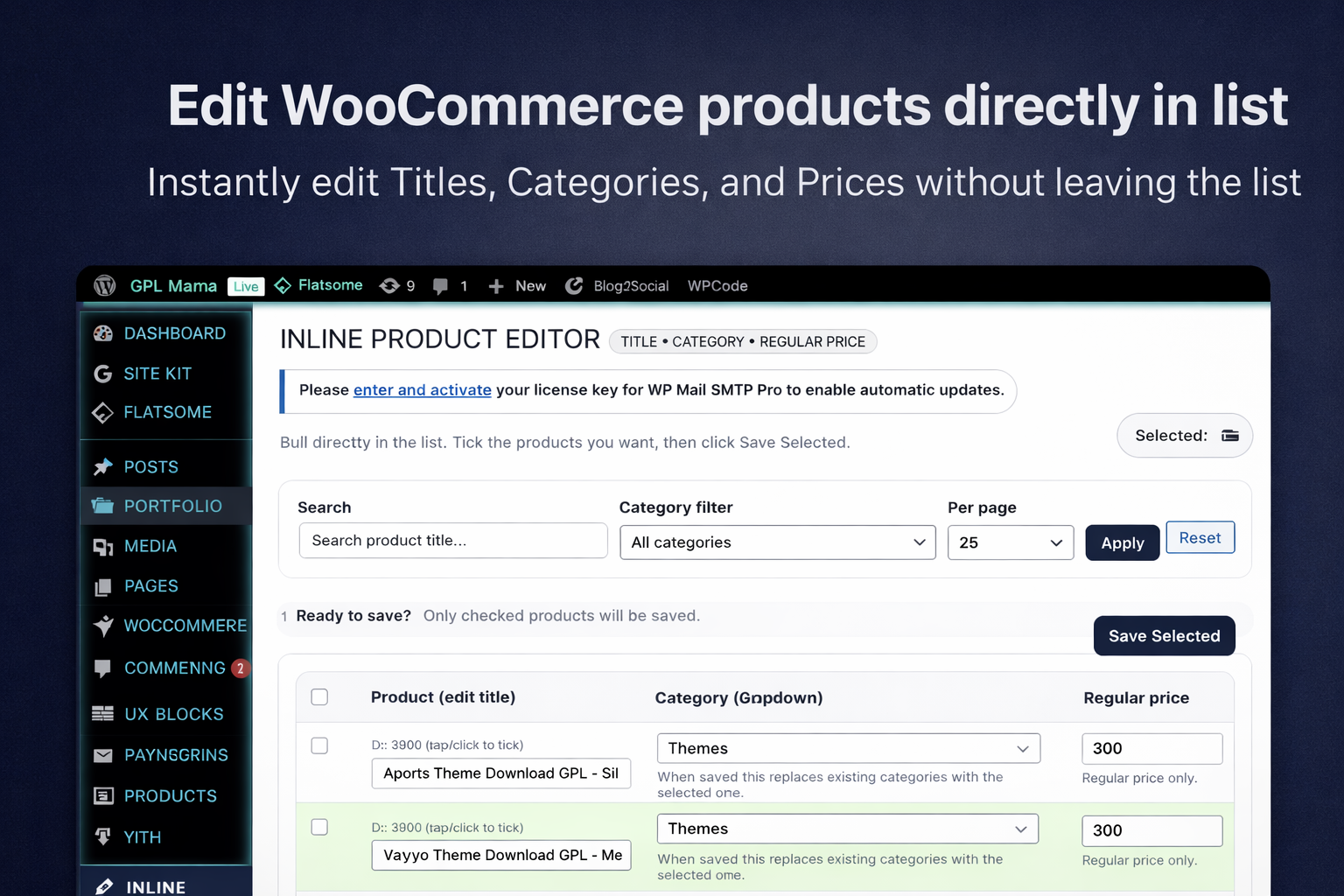
This snippet creates a dedicated page in your WooCommerce menu called Inline Product Editor. It focuses on the three things people change most often. These are the title, the product category, and the regular price. I purposely left out things like weight or dimensions because adding too many fields makes the UI messy and hard to use on a laptop screen. Here is what this tool actually handles for you:
- It lets you search for products by name so you do not have to scroll through thousands of items.
- It provides a category filter to narrow down your list to a specific group.
- It allows you to change the number of products shown per page.
- It gives you a text input for the title and the price that you can edit instantly.
- It includes a category dropdown that replaces the current category with a new one.
- It highlights rows in green as soon as you change a value so you know what you have touched.
Basically, it turns a thirty minute chore into a two minute task. You check the boxes for the rows you want to update, hit the save button at the top or bottom, and the script handles the database updates in the background. It is straightforward and does not try to be anything it is not.
The struggle of building a clean UI
I am not a designer. I usually stick to the backend because CSS makes me want to put my head through a wall. When I started writing this, the table looked terrible. It was just a bunch of inputs smashed together. I had to spend a couple of hours tweaking the styles to make it feel modern. I used a lot of flexbox and sticky positioning. I wanted the save button to stay visible even when you are scrolling through a long list of products. That sticky header was a pain to get right with the WordPress admin bar, but it makes a huge difference in how the tool feels. If you have to scroll all the way back to the top to save, the tool is broken in my opinion.
I also had to think about mobile. Most people do not manage their shops on a phone, but sometimes you are on the train and you notice a typo in a price. I wrote some media queries that stack the table cells vertically on small screens. It is not perfect, but it is usable. The real win was the JavaScript logic for marking changed rows. I did not want the script to try and update every single product on the page every time you hit save. That is a waste of resources. By adding a CSS class to the row when an input changes, I can visually track my progress. I also added a feature where you can click the product ID cell to toggle the checkbox. It sounds small, but clicking those tiny checkboxes over and over is annoying. Making the whole cell clickable makes the experience feel much more fluid.
The technical logic and tradeoffs
I made some specific choices with the PHP logic here. For the price cleaning, I had to handle different formats. Some people use commas for decimals and others use dots. I wrote a small helper function called price_clean that strips out the garbage and ensures the database gets a clean float. If you leave a price field blank, the script just ignores it instead of setting your product price to zero. That was a bug I hit in the first version and it nearly ruined my day. Checking for empty strings versus actual numerical zeros is a classic PHP headache.
I decided to use the admin_post hook for the saving logic. Some people would argue for an AJAX save every time a field loses focus. I thought about that, but AJAX in the WordPress admin can be flaky if you have other plugins interfering. I went with a standard form submission. It is more robust. When you hit save, it processes the data, redirects you back to the page, and shows a success notice. It feels solid. You know for a fact that the data went through. The tradeoff is a page reload, but for a bulk tool, I think that is a fair exchange for reliability. I also made sure to clear the WooCommerce product transients. If you do not do that, the old prices might still show up on your front end for a while because of caching. That is one of those small details that separate a quick hack from a real tool.
The code
<?php
/**
 * Plugin Name: WPCup Inline Bulk Product Editor (WooCommerce)
 * Description: Edit WooCommerce product Title, Category, and Regular Price directly from a list UI in WP Admin.
 * Version: 1.1.0
 * Author: WPCup
 */

if (!defined('ABSPATH')) exit;

class WPCUP_Inline_Bulk_Product_Editor {
  const SLUG = 'wpcup-inline-bulk-product-editor';
  const NONCE_ACTION = 'wpcup_inline_bpe_save';

  public function __construct() {
    add_action('admin_menu', array($this, 'menu'));
    add_action('admin_post_wpcup_inline_bpe_save', array($this, 'handle_save'));
    add_action('admin_enqueue_scripts', array($this, 'assets'));
  }

  public function menu() {
    add_menu_page(
      'Inline Product Editor',
      'Inline Product Editor',
      'manage_woocommerce',
      self::SLUG,
      array($this, 'page'),
      'dashicons-edit',
      56
    );
  }

  public function assets($hook) {
    if (empty($_GET['page']) || $_GET['page'] !== self::SLUG) return;

    $css = "
      .wpcup-wrap{max-width:1280px;}
      .wpcup-header{display:flex;align-items:flex-end;justify-content:space-between;gap:12px;flex-wrap:wrap;margin-top:8px;}
      .wpcup-title{margin:0;line-height:1.15;}
      .wpcup-sub{color:#6b7280;margin:6px 0 0;font-size:13px;}
      .wpcup-badge{display:inline-block;padding:4px 10px;border-radius:999px;background:#f3f4f6;border:1px solid #e5e7eb;font-size:12px;}
      .wpcup-card{background:#fff;border:1px solid #e5e7eb;border-radius:14px;padding:16px;margin:16px 0;box-shadow:0 1px 0 rgba(0,0,0,.02);}
      .wpcup-row{display:flex;gap:12px;flex-wrap:wrap;align-items:end;}
      .wpcup-row > div{flex:1 1 240px;}
      .wpcup-label{display:block;font-weight:600;margin-bottom:6px;}
      .wpcup-input,.wpcup-select{width:100%;padding:10px 12px;border:1px solid #d1d5db;border-radius:12px;background:#fff;}
      .wpcup-input:focus,.wpcup-select:focus{outline:none;box-shadow:0 0 0 3px rgba(59,130,246,.18);border-color:#93c5fd;}
      .wpcup-btn{padding:10px 14px;border-radius:12px;border:1px solid #111827;background:#111827;color:#fff;cursor:pointer;}
      .wpcup-btn:hover{opacity:.92;}
      .wpcup-btn-secondary{background:#fff;color:#111827;border:1px solid #d1d5db;}
      .wpcup-btn-secondary:hover{background:#f9fafb;}
      .wpcup-note{color:#6b7280;font-size:13px;margin-top:6px;}
      .wpcup-toolbar{display:flex;align-items:center;justify-content:space-between;gap:12px;flex-wrap:wrap;}
      .wpcup-toolbar-left{display:flex;align-items:center;gap:10px;flex-wrap:wrap;}
      .wpcup-pill{display:inline-flex;align-items:center;gap:8px;padding:8px 10px;border:1px solid #e5e7eb;border-radius:999px;background:#fafafa;color:#111827;font-size:13px;}
      .wpcup-table{width:100%;border-collapse:separate;border-spacing:0;border:1px solid #e5e7eb;border-radius:14px;overflow:hidden;}
      .wpcup-table th,.wpcup-table td{padding:12px 12px;border-bottom:1px solid #e5e7eb;vertical-align:top;}
      .wpcup-table th{background:#f9fafb;text-align:left;font-weight:700;position:sticky;top:0;z-index:1;}
      .wpcup-muted{color:#6b7280;font-size:12px;margin-top:6px;}
      .wpcup-changed{outline:2px solid rgba(34,197,94,.25);background:rgba(34,197,94,.06);}
      .wpcup-price{max-width:160px;}
      .wpcup-title-input{min-width:260px;}
      .wpcup-sticky{position:sticky;top:32px;z-index:5;}
      .wpcup-actions{display:flex;gap:10px;flex-wrap:wrap;align-items:center;}
      .wpcup-divider{height:1px;background:#e5e7eb;margin:12px 0;}
      @media (max-width: 900px){
        .wpcup-sticky{position:static;}
        .wpcup-table thead{display:none;}
        .wpcup-table, .wpcup-table tbody, .wpcup-table tr, .wpcup-table td{display:block;width:100%;}
        .wpcup-table tr{border:1px solid #e5e7eb;border-radius:14px;margin-bottom:12px;overflow:hidden;}
        .wpcup-table td{border-bottom:1px solid #e5e7eb;}
        .wpcup-table td:last-child{border-bottom:none;}
        .wpcup-table td[data-label]::before{
          content: attr(data-label);
          display:block;
          font-weight:700;
          color:#111827;
          margin-bottom:6px;
        }
        .wpcup-price{max-width:100%;}
      }
    ";
    wp_register_style('wpcup_inline_bpe_css', false);
    wp_enqueue_style('wpcup_inline_bpe_css');
    wp_add_inline_style('wpcup_inline_bpe_css', $css);

    $js = "
      document.addEventListener('DOMContentLoaded', function(){
        var selectAll = document.getElementById('wpcup_select_all');
        if(selectAll){
          selectAll.addEventListener('change', function(){
            var cbs = document.querySelectorAll('input[name=\"product_ids[]\"]');
            for (var i=0; i<cbs.length; i++) cbs[i].checked = selectAll.checked;
            updateSelectedCount();
          });
        }

        function updateSelectedCount(){
          var cbs = document.querySelectorAll('input[name=\"product_ids[]\"]');
          var count = 0;
          for (var i=0; i<cbs.length; i++) if (cbs[i].checked) count++;
          var el = document.getElementById('wpcup_selected_count');
          if(el) el.textContent = count;
        }

        var rowInputs = document.querySelectorAll('.wpcup-row-input');
        for (var i=0; i<rowInputs.length; i++){
          rowInputs[i].addEventListener('input', markChanged);
          rowInputs[i].addEventListener('change', markChanged);
        }

        function markChanged(e){
          var tr = e.target.closest('tr');
          if(tr) tr.classList.add('wpcup-changed');
        }

        var checkboxes = document.querySelectorAll('input[name=\"product_ids[]\"]');
        for (var i=0; i<checkboxes.length; i++){
          checkboxes[i].addEventListener('change', updateSelectedCount);
        }

        var toggles = document.querySelectorAll('[data-toggle-check]');
        for (var i=0; i<toggles.length; i++){
          toggles[i].addEventListener('click', function(){
            var tr = this.closest('tr');
            if(!tr) return;
            var cb = tr.querySelector('input[type=\"checkbox\"][name=\"product_ids[]\"]');
            if(cb){ cb.checked = !cb.checked; updateSelectedCount(); }
          });
        }

        updateSelectedCount();
      });
    ";
    wp_register_script('wpcup_inline_bpe_js', false);
    wp_enqueue_script('wpcup_inline_bpe_js');
    wp_add_inline_script('wpcup_inline_bpe_js', $js);
  }

  private function categories() {
    $terms = get_terms(array(
      'taxonomy' => 'product_cat',
      'hide_empty' => false,
      'orderby' => 'name',
      'order' => 'ASC'
    ));
    if (is_wp_error($terms)) return array();
    return $terms;
  }

  private function price_clean($v) {
    $v = trim((string)$v);
    if ($v === '') return '';
    $v = str_replace(',', '.', $v);
    if (!is_numeric($v)) return '';
    $n = (float)$v;
    if ($n < 0) $n = 0;
    return number_format($n, 2, '.', '');
  }

  public function page() {
    if (!current_user_can('manage_woocommerce')) wp_die('No permission.');
    if (!class_exists('WooCommerce')) {
      echo '<div class="wrap"><h1>Inline Product Editor</h1><div class="notice notice-error"><p>WooCommerce is not active.</p></div></div>';
      return;
    }

    $paged = isset($_GET['paged']) ? max(1, (int)$_GET['paged']) : 1;
    $per_page = isset($_GET['per_page']) ? max(10, min(200, (int)$_GET['per_page'])) : 25;
    $s = isset($_GET['s']) ? sanitize_text_field(wp_unslash($_GET['s'])) : '';
    $cat = isset($_GET['cat']) ? (int)$_GET['cat'] : 0;

    $args = array(
      'post_type' => 'product',
      'post_status' => array('publish','draft','private'),
      'posts_per_page' => $per_page,
      'paged' => $paged,
      'orderby' => 'date',
      'order' => 'DESC',
      's' => $s
    );

    if ($cat > 0) {
      $args['tax_query'] = array(
        array(
          'taxonomy' => 'product_cat',
          'field' => 'term_id',
          'terms' => array($cat)
        )
      );
    }

    $q = new WP_Query($args);
    $cats = $this->categories();

    $notice = '';
    if (!empty($_GET['wpcup_saved'])) {
      $notice = '<div class="notice notice-success is-dismissible"><p><strong>Saved.</strong> Selected products updated.</p></div>';
    } elseif (!empty($_GET['wpcup_error'])) {
      $notice = '<div class="notice notice-error is-dismissible"><p><strong>Error:</strong> ' . esc_html($_GET['wpcup_error']) . '</p></div>';
    }

    echo '<div class="wrap wpcup-wrap">';

    echo '<div class="wpcup-header">';
    echo '<div>';
    echo '<h1 class="wpcup-title">Inline Product Editor <span class="wpcup-badge">Title • Category • Regular Price</span></h1>';
    echo '<p class="wpcup-sub">Edit directly in the list. Tick the products you want, then click <strong>Save Selected</strong>.</p>';
    echo '</div>';
    echo '<div class="wpcup-actions">';
    echo '<span class="wpcup-pill">Selected: <strong id="wpcup_selected_count">0</strong></span>';
    echo '</div>';
    echo '</div>';

    echo $notice;

    echo '<div class="wpcup-card">';
    echo '<form method="get" class="wpcup-row">';
    echo '<input type="hidden" name="page" value="' . esc_attr(self::SLUG) . '">';

    echo '<div><label class="wpcup-label">Search</label><input class="wpcup-input" name="s" value="' . esc_attr($s) . '" placeholder="Search product title..."></div>';

    echo '<div><label class="wpcup-label">Category filter</label><select class="wpcup-select" name="cat">';
    echo '<option value="0">All categories</option>';
    foreach ($cats as $t) {
      echo '<option value="' . esc_attr($t->term_id) . '"' . selected($cat, (int)$t->term_id, false) . '>' . esc_html($t->name) . '</option>';
    }
    echo '</select></div>';

    echo '<div><label class="wpcup-label">Per page</label><select class="wpcup-select" name="per_page">';
    $opts = array(25, 50, 100, 200);
    foreach ($opts as $pp) {
      echo '<option value="' . esc_attr($pp) . '"' . selected($per_page, $pp, false) . '>' . esc_html($pp) . '</option>';
    }
    echo '</select></div>';

    echo '<div>';
    echo '<button class="wpcup-btn" type="submit">Apply</button> ';
    echo '<a class="button wpcup-btn-secondary" href="' . esc_url(admin_url('admin.php?page=' . self::SLUG)) . '">Reset</a>';
    echo '</div>';

    echo '</form>';
    echo '<div class="wpcup-note">Tip: click the product cell to quickly tick/untick a row. Green highlight means you changed something.</div>';
    echo '</div>';

    echo '<form method="post" action="' . esc_url(admin_url('admin-post.php')) . '">';
    echo '<input type="hidden" name="action" value="wpcup_inline_bpe_save">';
    wp_nonce_field(self::NONCE_ACTION, '_wpcup_nonce');
    echo '<input type="hidden" name="return_page" value="' . esc_attr(wp_unslash($_SERVER['REQUEST_URI'])) . '">';

    echo '<div class="wpcup-card wpcup-sticky">';
    echo '<div class="wpcup-toolbar">';
    echo '<div class="wpcup-toolbar-left">';
    echo '<strong>Ready to save?</strong>';
    echo '<span class="wpcup-note">Only checked products will be saved.</span>';
    echo '</div>';
    echo '<div class="wpcup-actions">';
    echo '<button class="wpcup-btn" type="submit">Save Selected</button>';
    echo '</div>';
    echo '</div>';
    echo '</div>';

    echo '<div class="wpcup-card">';

    if (!$q->have_posts()) {
      echo '<p>No products found.</p>';
      echo '</div></form></div>';
      return;
    }

    echo '<table class="wpcup-table">';
    echo '<thead><tr>';
    echo '<th><input id="wpcup_select_all" type="checkbox" title="Select all"></th>';
    echo '<th>Product (edit title)</th>';
    echo '<th>Category (dropdown)</th>';
    echo '<th>Regular price</th>';
    echo '</tr></thead><tbody>';

    while ($q->have_posts()) {
      $q->the_post();
      $id = get_the_ID();
      $title = get_the_title();

      $terms = get_the_terms($id, 'product_cat');
      $current_cat_id = 0;
      if (!is_wp_error($terms) && !empty($terms)) {
        $current_cat_id = (int)$terms[0]->term_id;
      }

      $price = get_post_meta($id, '_regular_price', true);
      $price = ($price !== '') ? $price : '';

      echo '<tr>';
      echo '<td><input type="checkbox" name="product_ids[]" value="' . esc_attr($id) . '"></td>';

      echo '<td data-toggle-check>';
      echo '<div class="wpcup-muted">ID: ' . esc_html($id) . ' (tap/click to tick)</div>';
      echo '<input class="wpcup-input wpcup-row-input wpcup-title-input" type="text" name="title[' . esc_attr($id) . ']" value="' . esc_attr($title) . '">';
      echo '</td>';

      echo '<td>';
      echo '<select class="wpcup-select wpcup-row-input" name="cat[' . esc_attr($id) . ']">';
      echo '<option value="0">No change</option>';
      foreach ($cats as $t) {
        $sel = selected($current_cat_id, (int)$t->term_id, false);
        echo '<option value="' . esc_attr($t->term_id) . '"' . $sel . '>' . esc_html($t->name) . '</option>';
      }
      echo '</select>';
      echo '<div class="wpcup-note">When saved, this replaces existing categories with the selected one.</div>';
      echo '</td>';

      echo '<td>';
      echo '<input class="wpcup-input wpcup-row-input wpcup-price" type="text" name="price[' . esc_attr($id) . ']" value="' . esc_attr($price) . '" placeholder="e.g. 19.99">';
      echo '<div class="wpcup-note">Regular price only.</div>';
      echo '</td>';

      echo '</tr>';
    }

    wp_reset_postdata();

    echo '</tbody></table>';

    $total_pages = (int)$q->max_num_pages;
    if ($total_pages > 1) {
      $base = add_query_arg(
        array(
          'page' => self::SLUG,
          's' => $s,
          'cat' => $cat,
          'per_page' => $per_page
        ),
        admin_url('admin.php')
      );

      echo '<div class="wpcup-divider"></div>';
      echo '<div class="wpcup-toolbar">';
      echo '<div class="wpcup-note">Page ' . esc_html($paged) . ' of ' . esc_html($total_pages) . '</div>';
      echo '<div class="wpcup-actions">';
      if ($paged > 1) {
        echo '<a class="button wpcup-btn-secondary" href="' . esc_url(add_query_arg('paged', $paged - 1, $base)) . '">Prev</a>';
      }
      if ($paged < $total_pages) {
        echo '<a class="button wpcup-btn-secondary" href="' . esc_url(add_query_arg('paged', $paged + 1, $base)) . '">Next</a>';
      }
      echo '</div></div>';
    }

    echo '</div>';
    echo '</form>';
    echo '</div>';
  }

  public function handle_save() {
    if (!current_user_can('manage_woocommerce')) wp_die('No permission.');

    $nonce = isset($_POST['_wpcup_nonce']) ? sanitize_text_field(wp_unslash($_POST['_wpcup_nonce'])) : '';
    if (!wp_verify_nonce($nonce, self::NONCE_ACTION)) wp_die('Security check failed.');

    $return = isset($_POST['return_page']) ? esc_url_raw(wp_unslash($_POST['return_page'])) : admin_url('admin.php?page=' . self::SLUG);

    $ids = isset($_POST['product_ids']) ? (array)$_POST['product_ids'] : array();
    $ids = array_filter(array_map('intval', $ids));

    if (empty($ids)) {
      wp_safe_redirect(add_query_arg(array('wpcup_error' => rawurlencode('No products selected.')), $return));
      exit;
    }

    $titles = (isset($_POST['title']) && is_array($_POST['title'])) ? $_POST['title'] : array();
    $cats   = (isset($_POST['cat']) && is_array($_POST['cat'])) ? $_POST['cat'] : array();
    $prices = (isset($_POST['price']) && is_array($_POST['price'])) ? $_POST['price'] : array();

    foreach ($ids as $product_id) {
      $post = get_post($product_id);
      if (!$post || $post->post_type !== 'product') continue;

      if (isset($titles[$product_id])) {
        $new_title = sanitize_text_field(wp_unslash($titles[$product_id]));
        if ($new_title !== '' && $new_title !== $post->post_title) {
          wp_update_post(array(
            'ID' => $product_id,
            'post_title' => $new_title
          ));
        }
      }

      if (isset($cats[$product_id])) {
        $new_cat_id = (int) sanitize_text_field(wp_unslash($cats[$product_id]));
        if ($new_cat_id > 0) {
          wp_set_object_terms($product_id, array($new_cat_id), 'product_cat', false);
        }
      }

      if (isset($prices[$product_id])) {
        $raw = sanitize_text_field(wp_unslash($prices[$product_id]));
        $clean = $this->price_clean($raw);

        if ($raw !== '' && $clean !== '') {
          update_post_meta($product_id, '_regular_price', $clean);
          $sale = get_post_meta($product_id, '_sale_price', true);
          if ($sale === '' || !is_numeric($sale)) {
            update_post_meta($product_id, '_price', $clean);
          }
        }
      }

      if (function_exists('wc_delete_product_transients')) {
        wc_delete_product_transients($product_id);
      }
    }

    wp_safe_redirect(add_query_arg(array('wpcup_saved' => 1), $return));
    exit;
  }
}

new WPCUP_Inline_Bulk_Product_Editor();
?>
Security & risks
Whenever you write a script that updates the database, you have to be careful. I put in several layers of protection here to make sure this does not break your store or open it up to hackers. Here is what you need to know about safety.
- User Permissions: I used the manage_woocommerce capability check. This means only admins or shop managers can see this page. A regular subscriber or a customer cannot access this menu or trigger the save function.
- Nonces: The save form uses a WordPress nonce. This prevents cross site request forgery. Basically, it ensures that the request actually came from your admin panel and not from some external site trying to mess with your data.
- Sanitization: Every single input is sanitized using sanitize_text_field and wp_unslash. I am not letting any raw HTML or weird characters into your database.
- Safe Redirects: The script uses wp_safe_redirect to return you to the editor page. This is a standard security practice to prevent malicious redirects.
- Risk: The biggest risk is human error. This tool replaces the category for the selected product. If you accidentally select the wrong category and hit save on fifty products, they will all move to that category. There is no undo button. Always make a database backup before doing large bulk edits. That is just common sense.
How to use
Getting this running is easy. You do not even need to create a plugin file if you do not want to. You can just use a snippet manager.
- Install the WPCode plugin or Code Snippets on your WordPress site.
- Create a new snippet and choose PHP Snippet.
- Copy the code provided above and paste it into the editor.
- Set the snippet to run everywhere or specifically in the admin area.
- Hit save and activate the snippet.
- Look for the Inline Product Editor link in your sidebar menu, usually near the WooCommerce icon.
- Search for your products, check the boxes for the ones you want to change, and click Save Selected.
If you prefer to make it a standalone plugin, just save the code as a .php file in your plugins folder and activate it. It is self contained and does not require any external libraries or files to work.
What I learned from the build
I feel pretty good about how this turned out. It is not a revolutionary piece of software, but it solved a real problem I was having. I learned a lot about how WooCommerce stores prices and how to efficiently clear transients.
The real win for me was getting the CSS to look decent without using a library like Bootstrap. It keeps the page load fast and the code footprint small. If you find yourself spending way too much time in the standard WooCommerce bulk editor, give this a try.
It is free, simple, and useful for the exact job it was built for. I might add more fields later like stock status or SKU, but for now, this handles the bulk of my work.